Most people do not have a shortage of recipes. They have a shortage of recipes they can find when it is time to make dinner.
A useful digital recipe collection is not the biggest possible archive. It is a focused, searchable library of dishes you genuinely cook or intend to try, with enough structure to help you choose a meal, buy the ingredients and follow the method. The simplest way to build one is to collect recipes into a single recipe manager, review each recipe as it arrives, organize it using a small set of consistent labels and remove anything that no longer earns its place.
That approach turns recipe collecting from a hobby of saving links into a practical cooking system.
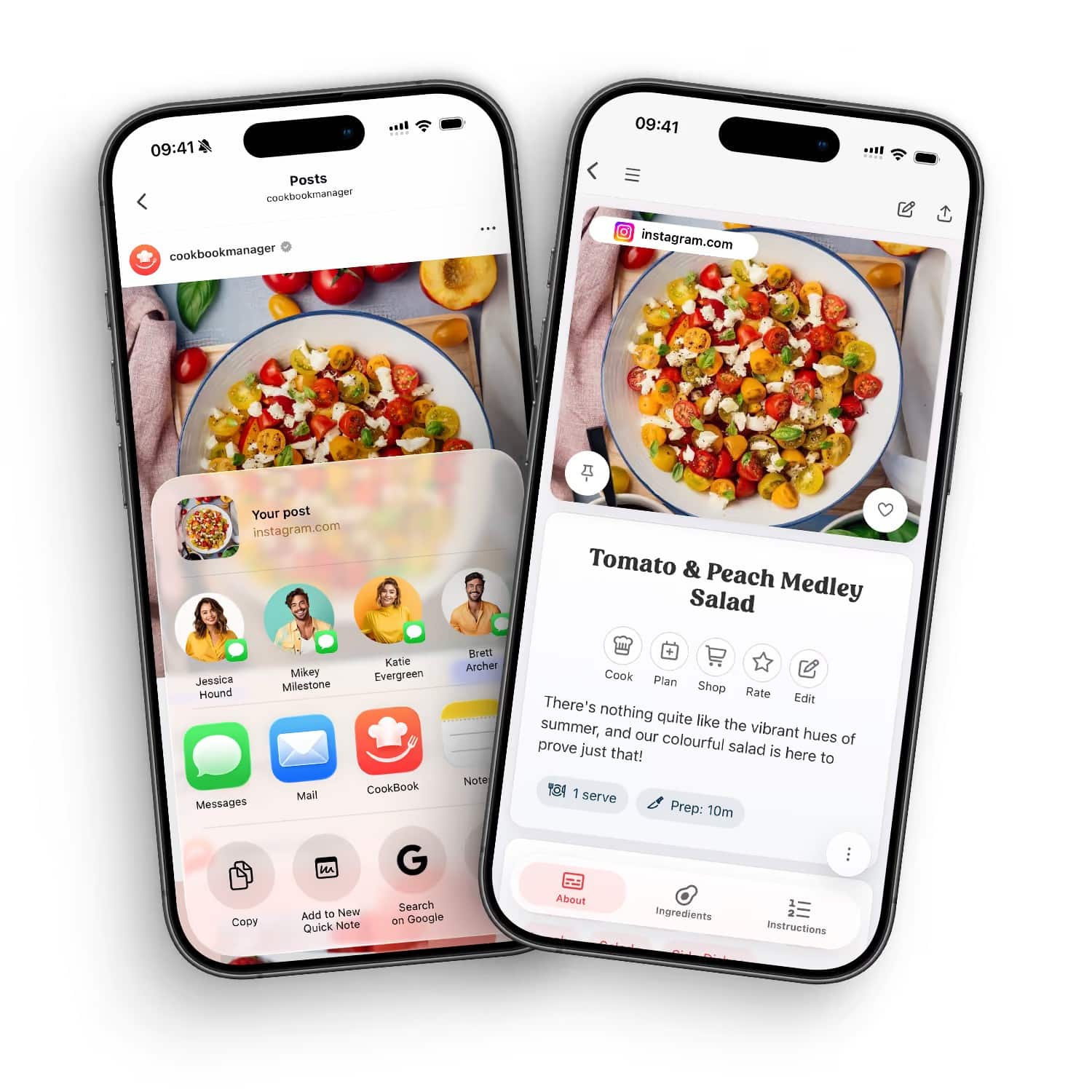
Table of Contents
Start with the recipes scattered around your life
Before choosing categories or importing hundreds of links, make a quick inventory. Your recipes may be hiding in more places than you realize:
- Bookmarks in two or three web browsers
- Screenshots on your phone
- Saved Instagram, TikTok, Facebook or Pinterest posts
- Notes, emails and messages from family members
- Printed recipes and magazine clippings
- Handwritten cards
- Cookbooks with folded corners or sticky notes
- A recipe app you stopped using
- Documents stored on a laptop
Do not try to move everything at once. Start with one source and the recipes you already use. For example, collect the ten dinners you make most often, the baking recipes you would be upset to lose and five recipes you genuinely plan to try this month.
This creates an immediately useful core. It also gives you a chance to improve your system before importing hundreds of items.
Choose a home for the collection
A digital recipe library works best when it has one main home. Browser folders, photo albums and social-media saves are useful capture tools, but they are difficult to search by ingredient and do not turn naturally into meal plans or grocery lists.
A specialist recipe manager stores the information as a recipe: title, ingredients, steps, servings, source, notes, images and organizational labels. That structure matters because it lets you search and use the collection in ways a normal bookmark folder cannot.
One option is CookBook recipe manager, a private recipe app for saving, organizing, planning and shopping from recipes. It can import recipes from websites and supported social platforms, turn photos of cookbook pages, clippings and handwritten cards into editable recipes, and sync a collection across supported iOS, Android and web devices. Saved recipes can be tagged, searched, rated, added to meal plans and used to create shopping lists.
Whatever tool you choose, look for a reliable import process, editable recipe fields, flexible search, an export or backup route that suits you, and access on the devices you use in the kitchen.
Separate capture from curation
The best recipe workflow has two stages.
The first is capture. Save a promising recipe while you are browsing, shopping or talking to a friend. Speed matters here. If capture requires ten minutes of typing, you will probably leave the recipe where it is.
The second is curation. Later, open the newly saved recipes and decide which ones belong in your permanent collection. Check the ingredients and method, add any missing detail and apply useful labels.
Separating these jobs prevents two common problems. First, it stops you from interrupting your day to perfect every recipe immediately. Second, it prevents your main library from becoming a dumping ground for ideas you will never use.
A simple approach is to give unreviewed recipes a “To review” tag. Set aside ten minutes once a week to process them. Delete obvious duplicates, correct incomplete recipes and move worthwhile ideas into the main collection.
Review every imported recipe
Automatic imports and recipe scans can save a great deal of typing, but they still need a human check. Websites differ in structure, social posts may omit details and handwriting can be difficult to read.
Review these fields before relying on an imported recipe:
- Title: Make it specific enough to distinguish the recipe from similar dishes.
- Ingredients: Check quantities, units and ingredient names.
- Method: Confirm that every ingredient is used and that the steps appear in the right order.
- Servings: Record the expected yield so future scaling makes sense.
- Times: Separate preparation and cooking time if the information is available.
- Source: Keep the original link, photograph or family attribution.
- Personal notes: Add changes you made, preferred brands, pan sizes or serving ideas.
For scanned family cards, retain an image of the original when possible. The handwriting, stains and annotations may carry context that a clean digital transcription cannot replace. The digital version should make the recipe easier to use, not erase its history.
Use fewer categories than you think you need
People often begin by creating a complicated filing system. They add dozens of categories, then forget which one to use. A smaller, predictable structure usually works better.
Begin with labels that answer questions you regularly ask:
- What kind of meal is this?
- How much time do I have?
- Who will enjoy it?
- When do I normally cook it?
- What do I want to make again?
A practical starter set might include:
- Breakfast, lunch, dinner, snack and dessert
- Quick, weekend and make-ahead
- Family favorite and guests
- Vegetarian, gluten-free or another dietary label that is relevant to your household
- Summer, winter and holiday
- To try and cook again
Cuisine labels such as Indian, Italian, Mexican or Thai can also help if you search that way. Resist adding a tag unless it will help you retrieve or plan a recipe later.
Make recipe titles easy to search
Titles such as “Mom’s best” or “That chicken recipe” may feel meaningful today, but they are difficult to find six months later. Include the main dish and one or two distinguishing details.
“Chicken” could become “Lemon Garlic Roast Chicken.” “Cookies” could become “Chewy Oatmeal Raisin Cookies.” A family recipe can preserve its personal connection while remaining searchable, such as “Aunt Rosa’s Tomato and Basil Sauce.”
Keep ingredient names consistent too. If some recipes say “bell pepper” and others say “capsicum,” choose the wording you naturally search for. You do not need to rewrite every recipe, but consistent terms make ingredient searches more reliable.
Record what happened when you cooked it
A collection becomes more valuable each time you cook from it. Add a short note while the result is still fresh in your mind.
Useful notes include:
- Whether the stated cooking time was accurate
- Which substitutions worked
- Whether children or guests liked it
- How much the recipe actually served
- Whether it froze and reheated well
- What you would change next time
- Which side dish completed the meal
Use ratings consistently. A five-star recipe might mean “everyone loved it and I would serve it to guests,” while a three-star recipe might mean “useful, but needs adjustment.” Your own rating system does not have to match anyone else’s. It only needs to help your future self choose.
Connect the library to meal planning
A searchable recipe collection proves its value when you use it to make decisions. Instead of starting each weekly meal plan with a blank page, filter the collection according to real constraints.
You might choose two quick dinners, one meal that uses ingredients already in the refrigerator, one family favorite and one new recipe. Add those dishes to the week, check serving sizes and move their ingredients to a shopping list.
This is where a recipe manager has an advantage over a folder of links. The recipes, plan and list can form one connected workflow. You can still adjust the list, remove pantry items, combine repeated ingredients and add household products that are not part of a recipe.
Planning does not need to mean assigning every meal. Even selecting three likely dinners can reduce last-minute decision pressure while leaving room for leftovers, invitations and changes of mind.
Prevent duplicates before they multiply
Duplicate recipes make a collection harder to trust. You may save the same popular pasta from a website, a social post and a screenshot without realizing it.
Before keeping a new recipe, search for its main ingredient and dish name. If a similar version already exists, decide whether the new one is genuinely different. You can keep variations when each serves a purpose, but name them clearly: “Weeknight Tomato Sauce,” “Slow-Cooked Tomato Sauce” and “Spicy Tomato Sauce” are easier to choose between than three entries called “Tomato Sauce.”
If the difference is minor, add it as a note or variation to the existing recipe instead of creating another card.
Build the collection in manageable rounds
If you have years of material, use a staged migration:
Round one: weekly essentials. Add the meals you cook most often and need immediately.
Round two: irreplaceable recipes. Digitize family cards, personal recipes and annotated favorites.
Round three: active inspiration. Process the social saves, screenshots and bookmarks you still want to try.
Round four: reference archive. Review older clippings, files and cookbook markers only when time allows.
Twenty well-organized recipes are more useful than 500 unreviewed imports. A collection can grow gradually without becoming another unfinished household project.
Maintain the library with a short monthly reset
Once a month, spend 15 minutes on maintenance:
- Review recipes marked “To try” or “To review”
- Merge duplicates
- Add notes to recently cooked dishes
- Remove recipes you no longer want
- Check that new recipes have useful titles and labels
- Mark dependable meals as favorites
- Choose a few recipes for the coming weeks
This small habit keeps search results meaningful. It also makes the collection reflect how you cook now rather than how you imagined cooking several years ago.
Frequently asked questions about digital recipe collections
What is the simplest way to organize recipes from different sources?
Choose one main recipe library, add the recipes you use most, check each imported recipe and apply a small set of consistent labels. Keep source links or images so you can return to the original when needed.
Should every saved recipe go into the permanent collection?
No. Treat social saves, screenshots and bookmarks as an inbox. Move only useful, complete recipes into the main library, and delete duplicates or ideas you no longer expect to cook.
Can handwritten recipe cards become searchable?
Yes. A recipe scanner can convert a clear photo into editable ingredients and steps. Always compare the result with the card, correct uncertain quantities and retain the original image for context when possible.
A useful library is personal, not perfect
There is no universal recipe organization system. A baker may care about pan size and technique. A parent may search by cooking time and family approval. A gardener may organize recipes around seasonal produce. Someone preserving family history may care most about the original image and the person who wrote it.
The right system is the one that answers your recurring kitchen questions quickly. Start with recipes you already cook, keep the structure simple, check every import and add what you learn after making a dish. Over time, your digital collection will become more than storage. It will become a practical record of what your household actually enjoys eating.